
Want to create a landing page in WordPress that converts visitors into customers?
In this comprehensive guide, you’ll learn exactly how to create a landing page in WordPress that converts visitors into customers. We’ll walk through the entire process step-by-step, from choosing the right tools to optimizing for maximum conversions. By the end of this tutorial, you’ll have everything you need to build professional, high-converting landing pages for your business.create landing page WordPress
What is a Landing Page and Why Do You Need One? landing page WordPress
A landing page is a standalone web page created specifically for a marketing or advertising campaign. When someone clicks on a link in an email, ad, or social media post, they “land” on this page—hence the name.
Unlike your homepage or blog posts that have multiple goals and navigation options, landing pages are designed with a single focus or goal, known as a call to action (CTA). This singular focus makes landing pages the best option for increasing conversion rates of your marketing campaigns.
According to marketing research, businesses with 10-15 landing pages see a 55% increase in leads compared to those with fewer than 10 pages. Companies with 40+ landing pages generate 12 times more leads than those with 1-5 landing pages. These statistics demonstrate the incredible power of dedicated landing pages for your business growth.create landing page WordPress
Common uses for landing pages include:
Collecting email addresses for your mailing list
Selling products or services directly
Promoting webinar or event registrations
Offering free downloads like ebooks or templates
Encouraging software trial sign-ups
Promoting limited-time offers or seasonal campaigns
Landing Pages vs. Regular Website Pages: Key Differences
Understanding the difference between landing pages and regular website pages is crucial for creating effective campaigns. Here are the main distinctions:
Navigation: Regular pages include full website navigation menus, while landing pages typically have minimal or no navigation to keep visitors focused on the conversion goal.
Content Focus: Website pages cover broad topics and encourage exploration, whereas landing pages focus exclusively on one offer, product, or action.
Call to Action: Regular pages may have multiple CTAs or none at all, but landing pages feature a single, prominent CTA that appears multiple times.
Traffic Sources: Regular pages receive organic search traffic, while landing pages are typically accessed through paid ads, email campaigns, or social media promotions.
Design Purpose: Website pages are designed for browsing and information discovery, while landing pages are optimized specifically for conversions.
Essential Elements of a High-Converting Landing Page
Before we dive into how to create a landing page in WordPress, let’s examine the key elements that make landing pages convert:
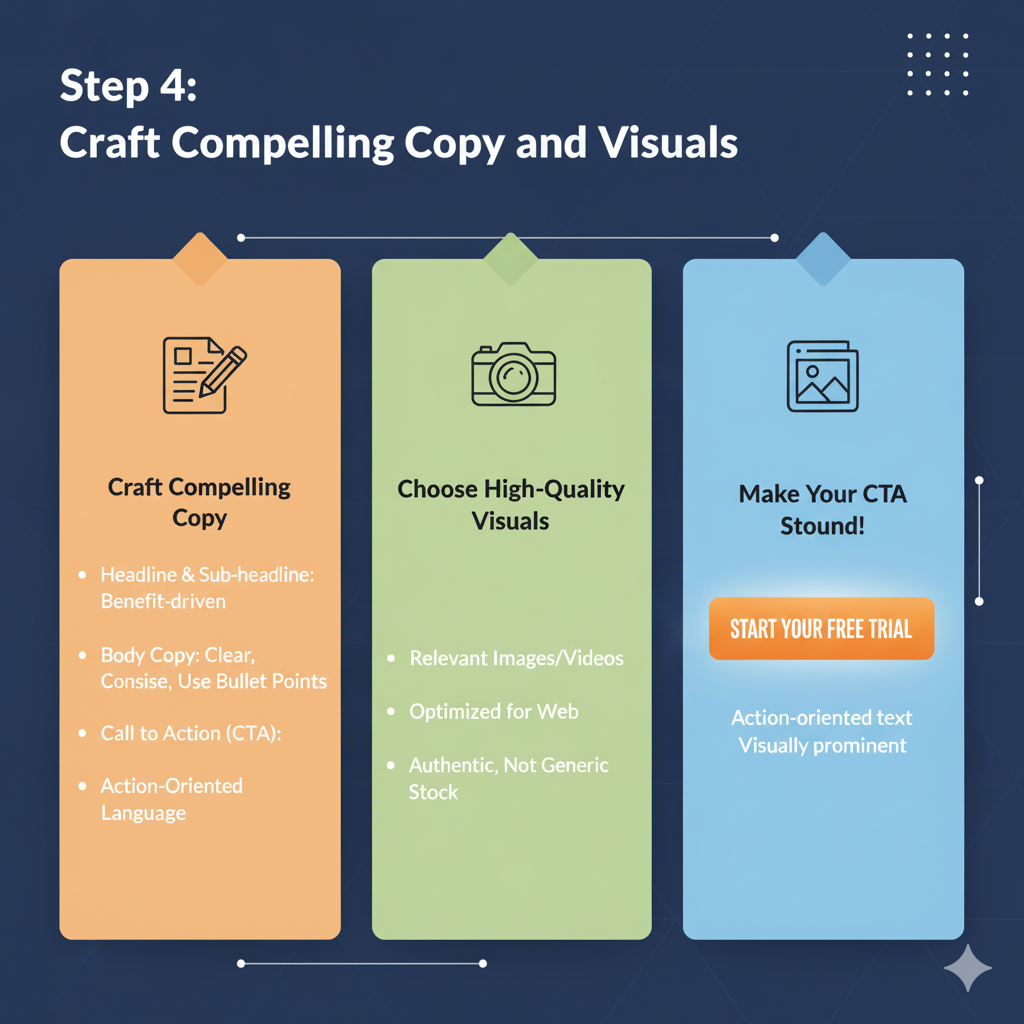
Compelling Headline
Your headline is the first thing visitors see and determines whether they’ll stay or leave. A strong headline clearly communicates your value proposition in 10 words or less and addresses the visitor’s pain point or desire. For example, “Create Professional Landing Pages in Minutes Without Coding” immediately tells visitors what they’ll get and how easy it is.
Clear Value Proposition
Your value proposition explains why someone should choose your offer over competitors. It should be specific, quantifiable, create landing page WordPress and benefit-focused. Instead of saying “Great Email Marketing Software,” say “Increase Your Email Open Rates by 40% in 30 Days.create landing page WordPress
Engaging Visuals
High-quality images, videos, or graphics help visitors understand your offer and build trust. Visual content should showcase your product in action, demonstrate results, or evoke the desired emotional response. Product screenshots, demo videos, and lifestyle images work particularly well.create landing page WordPress
Social Proof
Testimonials, reviews, case studies, and trust badges dramatically increase conversions by reducing visitor anxiety. Include specific results when possible, such as “This tool helped us generate 300% more leads in just 2 months”. Display logos of well-known clients or media mentions to build credibility instantly.
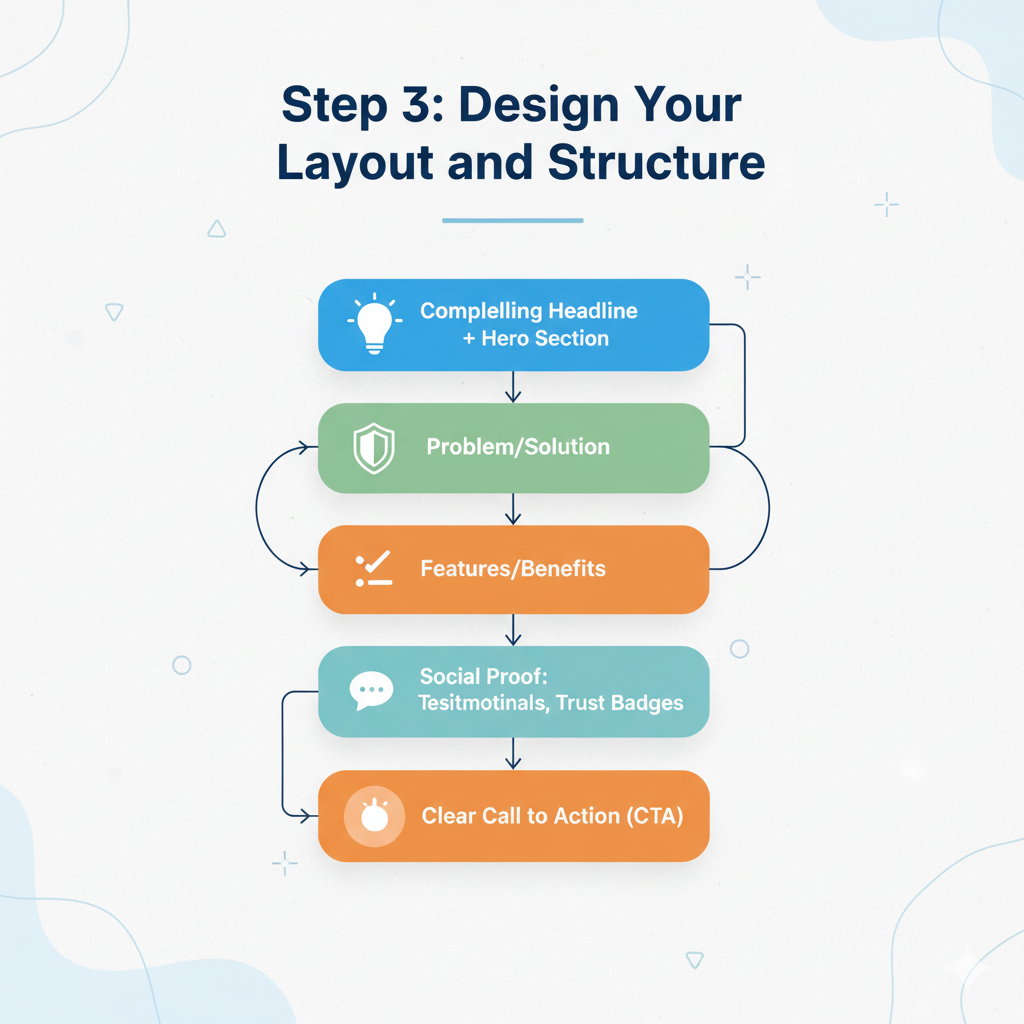
Strong Call to Action (CTA)
Your CTA button is the most important element on your landing page. Use action-oriented language like “Start Your Free Trial,” “Download Now,” or “Get Instant Access” instead of generic phrases like “Submit” or “Click Here”. Make your CTA button visually prominent with contrasting colors that stand out from the rest of your page design.
Minimal Form Fields
Every additional form field reduces conversion rates. Only ask for information you absolutely need—typically just name and email address for lead generation campaigns. If you need more data, consider using multi-step forms that feel less overwhelming.create landing page WordPress
Mobile Responsiveness
Over 60% of web traffic comes from mobile devices, so your landing page must look and function perfectly on smartphones and tablets. Use responsive design techniques and test your page on multiple devices before launching.
How to Create a Landing Page in WordPress: Step-by-Step create landing page WordPress
Now let’s walk through the complete process of creating a landing page in WordPress. We’ll cover multiple methods so you can choose the approach that best fits your needs and skill level.
Method 1: Using a WordPress Landing Page Plugin (Recommended)
This is the easiest and most powerful method to create a landing page in WordPress. Landing page plugins provide drag-and-drop builders, pre-designed templates, and conversion optimization features.
Step 1: Choose and Install a Landing Page Plugin
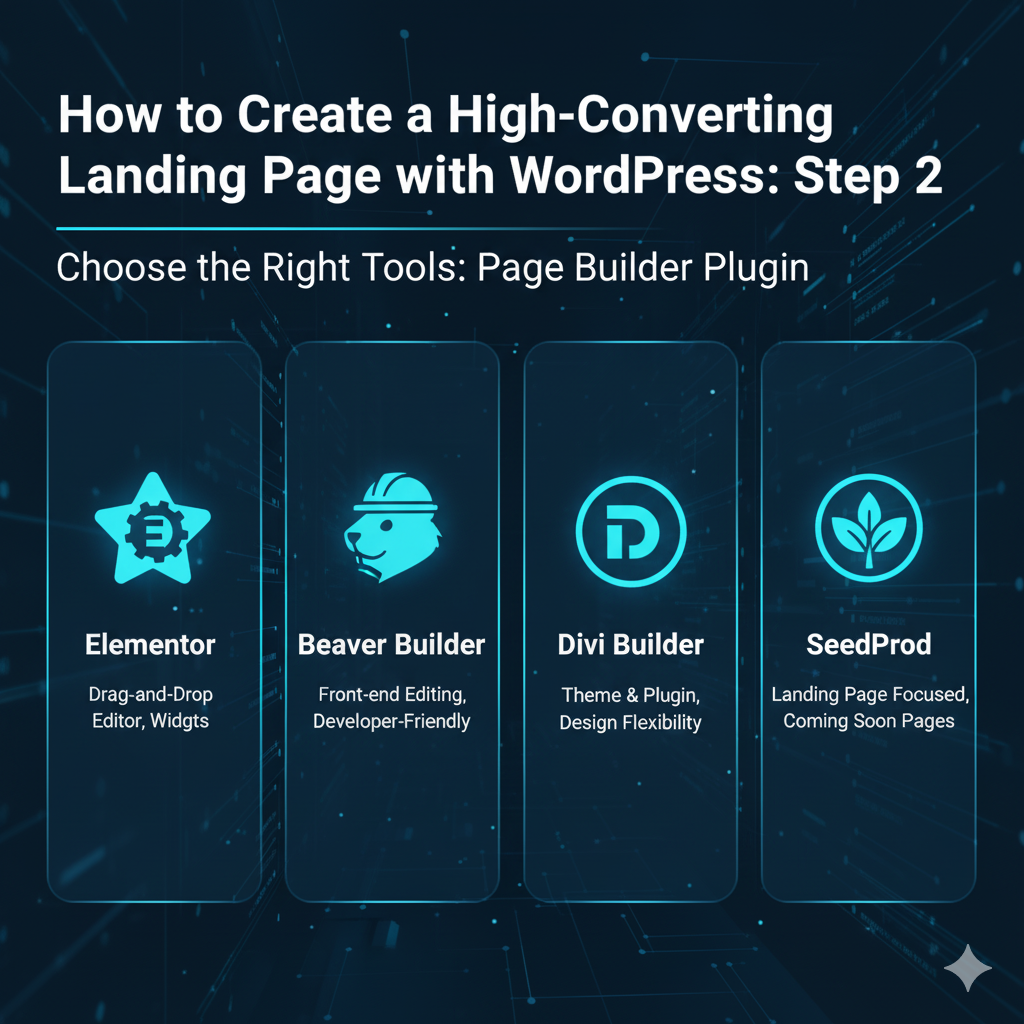
Several excellent WordPress landing page plugins are available. Here are the top options:
SeedProd – create landing page WordPress The most beginner-friendly option with 150+ templates and a visual drag-and-drop builder. Perfect for users without coding knowledge.
Elementor Pro – Extremely flexible with a huge template library and extensive customization options. Also includes popup builder functionality.
Thrive Architect – Focused specifically on conversion optimization with built-in A/B testing and conversion-focused elements.
Divi Builder – Comes with split testing capabilities and allows you to build entire WordPress themes, not just landing pages.
Leadpages – A SaaS solution that integrates with WordPress, offering advanced features like integrated checkouts and extensive third-party integrations.
For this tutorial, create landing page WordPress we’ll use SeedProd because it’s the most user-friendly option for beginners while still offering professional results.
To install SeedProd:
Go to Plugins > Add New in your WordPress dashboard
Search for “SeedProd”
Click Install Now and then Activate
Enter your license key (or use the free version to get started)
Step 2: Create Your First Landing Page
After activating SeedProd, follow these steps to create a landing page in WordPress:
create landing page WordPress
Click the Add New Landing Page button
Choose your landing page type (Sales Page, Lead Squeeze, Coming Soon, etc.)
Browse the template library and select a design that matches your goal
Click Choose Template to load it into the editor
SeedProd offers over 150 professionally designed templates for different purposes, including lead generation, product launches, webinar registrations, and e-commerce sales.
Step 3: Customize Your Landing Page with the Drag-and-Drop Builder
Now comes the fun part—customizing your landing page to match your brand and offer:
Edit the Headline: Click on the headline text to edit it directly. Create a compelling headline that clearly states your value proposition.
Modify Images: Click any image to replace it with your own. Upload product screenshots, photos, or graphics that support your message.
Customize the CTA Button: Click your call-to-action button to change the text, color, size, and link destination. Use contrasting colors to make it stand out.
Add or Remove Sections: Use the drag-and-drop interface to add new blocks from the left sidebar. Popular options include testimonials, feature lists, countdown timers, and video embeds.
Adjust Colors and Fonts: Click the global settings icon to modify your color scheme and typography to match your brand identity.
Edit Form Fields: Click on your opt-in form to add or remove fields. Remember to keep it simple—only ask for essential information.create landing page WordPress
The drag-and-drop builder makes it incredibly easy to create a landing page in WordPress without any coding knowledge. Everything updates in real-time so you can see exactly how your page will look.
Step 4: Connect Your Email Marketing Service
To capture leads effectively, you need to connect your landing page to an email marketing service:
Click on your opt-in form block
Go to the Integrations tab
Select your email service provider from the list (Mailchimp, ConvertKit, AWeber, etc.)
Follow the prompts to authenticate your account
Choose which email list new subscribers should join create landing page WordPress
SeedProd create landing page WordPress integrates with all major email marketing platforms, ensuring your leads are automatically added to your mailing list.
Step 5: Configure SEO Settings
Even though landing pages are typically driven by paid traffic, proper SEO setup is still important:
Click the Page Settings icon in the bottom-left corner
Navigate to the SEO tab
Enter your focus keyword: “create landing page WordPress”
Write a compelling meta title (50-60 characters)
Craft a meta description (150-160 characters)
Add your focus keyword to the page URL slug
If you’re using Rank Math SEO, it will automatically appear in the SeedProd editor, allowing you to optimize your landing page just like any WordPress page.
Step 6: Add Tracking and Analytics
To measure your landing page performance, install tracking codes:
Go to Page Settings > Scripts
Add your Google create landing page WordPress Analytics tracking code
Include Facebook Pixel for retargeting campaigns
Add any conversion tracking scripts from your ad platforms
Tracking is essential for understanding which traffic sources convert best and calculating your return on investment.create landing page WordPress
Step 7: Publish Your Landing Page
Once you’re satisfied with your design, it’s time to publish:
Click the Save button to save your work
Click the Publish button in the top-right corner
Choose your publishing option:
As a Page: Creates a standard WordPress page
As a Custom URL: Uses a completely custom URL structure
Copy your landing page URL to use in campaigns
Your landing page is create landing page WordPress now live and ready to accept visitors! You can always return to the editor to make changes or create variations for A/B testing.
Method 2: Create a Landing Page Using WordPress Block Editor
If you prefer not to use plugins, you can create a landing page in WordPress using the native block editor (Gutenberg):create landing page WordPress
Step 1: Create a New Page
Go to Pages > Add New in your WordPress dashboard
Give your page a descriptive name
Click the + icon to add blocks
Step 2: Add Content Blocks
Build your landing page using WordPress blocks:
Cover Block: Create an eye-catching hero section with headline and CTA
Columns Block: create landing page WordPress
Image Block: Add product screenshots or promotional images
Buttons Block: Insert your call-to-action buttons
Testimonials: Use quote blocks for social proof
Forms: Install a form plugin like WPForms or Contact Form 7
Step 3: Customize Block Settings
Click each block to access its settings panel on the right side. Adjust colors, spacing, typography, and alignment to create a cohesive design.
Step 4: Remove Navigation (Important)
To create a true landing page experience, you need to remove the header and footer navigation:
Look for a Template option in the page settings (sidebar)
Select a blank template if your theme offers one
If not, you may need to create a custom page template or use a plugin like Elementor or Beaver Builder
Step 5: Publish Your Page
create landing page WordPress Click Publish when you’re done. This method gives you full control but requires more manual design work compared to using a dedicated landing page plugin.
Method 3: Using a Landing Page Theme
Another approach is to use a WordPress theme specifically designed for creating landing pages:
Popular landing page themes include:
Astra – Lightweight with starter templates
Neve – Fast-loading with demo landing pages
OceanWP – Includes landing page templates
Zakra – create landing page WordPress Multiple pre-built landing page demos
After installing a landing page theme:
Install and activate your chosen theme
create landing page WordPress
Customize it with your own content
Set it as your homepage or publish it as a separate page
This method works well if you’re building a site focused primarily on landing pages or if you want your homepage to function as a landing page.
Landing Page Design Best Practices
Creating a landing page is one thing—creating one that converts is another. Follow these proven design principles to maximize your conversion rates:
create landing page WordPress
Eye-tracking studies show that people scan web pages in an F-shaped pattern, starting at the top-left and moving right, then down the left side. Place your most important elements (headline, value proposition, CTA) where users naturally look first.
Use Visual Hierarchy
Guide visitors’ attention through your page using size, color, contrast, and spacing. Your headline should be the largest element, followed by subheadings, body text, and supporting details. Make your CTA button highly visible with contrasting colors.
create landing page WordPress
Use arrows, images of people looking toward your CTA, or subtle design elements that guide visitors’ eyes toward your conversion point. These psychological triggers significantly improve click-through rates.
Optimize Above the Fold
The “above the fold” area—what’s visible without scrolling—is prime real estate on your landing page. Include your headline, value proposition, compelling visual, and primary CTA in this space. Don’t make visitors hunt for what you’re offering.
Create Cognitive Ease
Make your landing page easy to process mentally by using simple language, clear formatting, plenty of white space, and familiar design patterns. Cognitive ease builds trust and reduces the mental effort required to take action.create landing page WordPress
Match Message to Traffic Source
Your landing page headline and messaging should match the ad, email, or link that brought visitors there. This creates a seamless experience and reassures visitors they’re in the right place. If your ad promises “Free SEO Audit,” your landing page headline should mention the free SEO audit.
Use Contrasting CTA Colors
Your call-to-action button should stand out prominently from your page design. If your landing page uses blue tones, consider an orange or red CTA button. The contrast draws attention and improves click-through rates significantly.
Minimize Distractions
Remove navigation menus, sidebars, and external links that could take visitors away from your landing page. Every element should guide visitors toward your single conversion goal. Less is more when it comes to landing page design.
Include Multiple CTAs
While you should have one conversion goal, place your CTA button in multiple locations—above the fold, in the middle of your content, and at the bottom. This gives visitors multiple opportunities to convert without being pushy.
How to Optimize Your Landing Page for Conversions create landing page WordPress
Creating a landing page is just the beginning. Here’s how to optimize it for maximum performance:
Run A/B Split Tests
Test different versions of your landing page elements to discover what resonates best with your audience. Test one element at a time—headline, CTA button color, form length, or image—and measure the results. Tools like Thrive Architect and Divi Builder include built-in split testing functionality.create landing page WordPress
Add Trust Signals
Include security badges, money-back guarantees, privacy assurances, and certifications to reduce visitor anxiety. Trust signals are especially important for landing pages that ask for payment information or sensitive data.
Use Video Content
Landing pages with video content convert up to 86% better than those without. Create a short explainer video (60-90 seconds) that demonstrates your product, explains your offer, or features customer testimonials.
Implement Exit-Intent Popups
Capture abandoning visitors with a last-chance offer or lead magnet delivered via exit-intent popup. Plugins like OptinMonster and Elementor Pro include this functionality and can recover up to 15% of abandoning visitors.
Optimize Page Speed
Landing pages must load quickly or visitors will leave before seeing your offer. Aim for load times under 3 seconds. Use image compression, enable caching, and choose fast hosting to improve performance. Tools like WP Rocket and Smush can help optimize WordPress landing pages.
Simplify Your Forms
Every form field you remove increases conversion rates by approximately 10%. Start with just name and email address. You can collect additional information later through welcome emails or progressive profiling.
Create Urgency and Scarcity
Add countdown timers, limited-availability messaging, or expiring bonuses to encourage immediate action. Psychological triggers like urgency and scarcity significantly boost conversion rates when used authentically.
Write Compelling Copy
Focus on benefits rather than features in your landing page copy. Instead of “Our software has 50 integrations,” write “Connect all your favorite tools and save 5 hours per week.” Speak directly to your target audience’s pain points and desires.create landing page WordPress
Common Landing Page Mistakes to Avoid
Learn from these common pitfalls that reduce landing page conversions:
Too Many Options: Offering multiple CTAs or navigation choices confuses visitors and reduces conversions. Stick to one clear conversion goal.
Weak Headlines: Generic or unclear headlines fail to capture attention. Your headline must communicate value within 3 seconds.
Long Forms: Asking for too much information upfront creates friction and reduces conversions. Only request essential data.
Poor Mobile Experience: Landing pages that don’t work properly on mobile devices miss out on over 60% of potential traffic.create landing page WordPress
No Social Proof: Visitors need reassurance from others before taking action. Always include testimonials, reviews, or case studies.
Unclear Value Proposition: If visitors don’t immediately understand what you’re offering and why it matters, they’ll leave. State your value proposition prominently.
Slow Load Times: Every second of load time costs you conversions. Optimize images, use caching, and choose quality hosting.
Missing CTAs Above the Fold: Don’t make visitors scroll to find your call to action. Place it prominently in the initial viewport.create landing page WordPress
create landing page WordPress Best WordPress Landing Page Plugins Compared
Here’s a detailed comparison of the top landing page plugins to help you choose the right tool:
SeedProd – Best for beginners and small businesses. Offers 150+ templates, drag-and-drop builder, and integrations with all major email services. Pricing starts at $39.50/year.
Elementor Pro – Best for advanced customization. Includes theme builder, popup builder, and WooCommerce integration. Very popular with 5+ million active installations. Pricing starts at $59/year.
Thrive Architect – Best for conversion optimization. Built specifically for marketers with conversion-focused elements and built-in A/B testing. Pricing starts at $97/year.
Divi Builder – Best for split testing. Only native WordPress plugin with built-in A/B testing. Also includes theme building capabilities. Pricing starts at $89/year.
Leadpages – Best for advanced features. SaaS solution with integrated checkouts, extensive integrations, and advanced analytics. More expensive at $37/month.
Choose based on your budget, technical skill level, and specific requirements. For most users, SeedProd or Elementor Pro provides the best balance of features and ease of use.
Integrating Your Landing Page with Marketing Tools
To maximize your landing page effectiveness, integrate it with your marketing stack:
Email Marketing: Connect to Mailchimp, ConvertKit, ActiveCampaign, or AWeber to automatically add leads to your email sequences.
CRM Systems: Integrate with Salesforce, HubSpot, or Pipedrive to automatically create lead records and trigger sales workflows.
Payment Processors: Add Stripe or PayPal checkout functionality to accept payments directly on your landing page.
Analytics Platforms: Install Google Analytics, Facebook Pixel, and conversion tracking scripts to measure performance accurately.
Webinar Software: Connect to Zoom, WebinarJam, or GoToWebinar for automated webinar registrations.
SMS Marketing: Integrate with Twilio or other SMS platforms to send confirmation messages or follow-ups.create landing page WordPress
Most landing page plugins include built-in integrations or support Zapier for connecting to thousands of apps.
Measuring Landing Page Success
Track these key metrics to evaluate your landing page performance:
Conversion Rate: The percentage of visitors who complete your desired action. Calculate by dividing conversions by total visitors. Average landing page conversion rates range from 2-5%, with top performers achieving 10%+.
Bounce Rate: The percentage of visitors who leave without taking action. High bounce rates (above 70%) indicate problems with your messaging, design, or traffic quality.
Time on Page: How long visitors spend on your landing page. More time generally indicates engagement, but too much time might suggest confusion.create landing page WordPress
Traffic Sources: Which channels (paid ads, email, social media, organic search) drive the most conversions. Focus your budget on high-performing sources.create landing page WordPress
Cost Per Conversion: Total advertising spend divided by number of conversions. This metric determines profitability and ROI.create landing page WordPress
Table of Contents
Use Google Analytics, heatmap tools like Hotjar, and form analytics to understand visitor behavior and identify optimization opportunities.